



Lucky Fish Intro
Lucky Fish launched in mid-2025 and has become one of the busiest new betting brands in South Africa. It’s run by Race Coast Western Cape (Pty) Ltd, a racing operator, which shows in the depth of its horse racing book, and it’s locally licensed rather than offshore. This page covers how to log in, how to fix it when you can’t, how to register in about three minutes, and an honest review of the sportsbook, casino, banking and where it still falls short.
|
Quick facts |
|
|---|---|
|
Login credential |
Cellphone number + password |
|
Login URL |
|
|
One account |
Casino, sportsbook and Lucky Numbers share one balance |
|
Password reset |
SMS or email, verified with ID/passport |
|
Apps |
Android (APK), iOS (App Store), Huawei (AppGallery) |
|
Welcome offer |
R50 no-deposit bonus + 50 bonus spins (30c each) |
|
Bonus wagering |
R50 at 1.5+ on horse racing, or 6/1+ on other sports |
|
Licences |
Mpumalanga Economic Regulator 9-2-1-09838, plus Western Cape and Eastern Cape boards |
|
Support |
24/7 live chat · 087 365 0651 |
Quick facts:
- Login credentials: Cellphone number + password
- Login URL: luckyfish.co.za
- One account: Casino, sportsbook and Lucky Numbers share one balance
- Password reset: SMS or email, verified with ID/passport
- Apps: Android (APK), iOS (App Store), Huawei (AppGallery)
- Welcome offer: R50 no-deposit bonus + 50 bonus spins (30c each)
- Bonus wagering: R50 at 1.5+ on horse racing, or 6/1+ on other sports
- Licences: Mpumalanga Economic Regulator 9-2-1-09838, plus Western Cape and Eastern Cape boards
- Support: 24/7 live chat, 087 365 0651
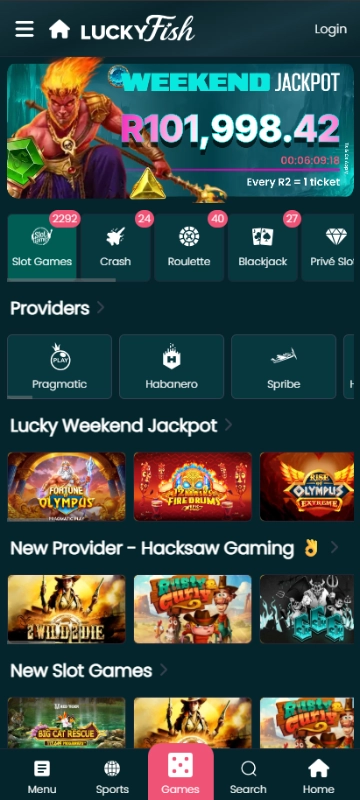
How to log in to Lucky Fish
Signing up at Lucky Fish takes about five minutes if you have your details ready. Here’s how to get registered and claim your R50 no-deposit bonus.
What You’ll Need Before You Start
Get these items together so you don’t have to pause halfway through:
- Your valid South African ID number.
- Your cellphone number (this becomes your login).
- A working email address.
- Proof of address (not always needed at sign-up, but you’ll need it for FICA).
- Bank details for later deposits and withdrawals.
You also need to be 18 or older and a South African resident. Lucky Fish only accepts SA-based players.
Go to the official site
Tap Login
Enter your cellphone number and password
Enter the one-time PIN if you’re asked for one
You’ll land on the homepage with your balance at the top. One login covers everything: casino, sportsbook, Lucky Numbers, banking and your account settings all run off the same account and the same balance. There’s no separate casino login.
Lucky Fish Login on Mobile
Lucky Fish was built mobile-first, and the login is genuinely quicker on a phone than on a laptop. Your balance, open bets and bonus progress sync instantly, so a bet placed on your phone shows up on your laptop straight away.
The app uses the same login as the site: your cellphone number and password. There’s no separate app account, and no need to register again if you already have one.
If you’d rather not install anything, add the site to your home screen instead:
- Chrome (Android): menu (⋮) → Add to Home screen → confirm.
- Safari (iPhone): share button (□↑) → scroll down → Add to Home Screen → Add.
- Samsung Internet: menu (≡) → Add page to → Home screen.
It then opens full-screen without the address bar, and your session usually persists between visits, so you don’t have to re-enter your password each time.
Lucky Fish Login Not Working? Fixes for Every Common Problem
Forgot your password
Why: This is the most common issue by far. Fix: On the login form, tap Change Password or Cell Number → Change Password. Choose SMS or email for the code, then verify with your ID or passport number plus your registered cellphone number. SMS usually arrives in about 30 seconds; email can take 1-5 minutes and often lands in Spam or Promotions.
“Invalid credentials” but you’re sure the password is right
Why: You’re entering an email address, or the wrong SIM’s number. Fix: Lucky Fish logs you in with your cellphone number. Use the number you registered with, without a country code or trailing spaces.
One-time PIN never arrives
Why: Network delays, worst on Vodacom and MTN between 6 pm and 9 pm. Fix: Wait a full 60 seconds before tapping Resend. Requesting several codes in a row invalidates the earlier ones, so only the newest will work. Check you have signal and that your SMS inbox isn’t full.
Account locked
Why: Too many failed login attempts, an automatic protection measure. Fix: Wait about 30 minutes, and the lock usually lifts by itself. If it doesn’t, contact live chat or call 087 365 0651 with your ID number and registered cellphone number ready.
Login page loops or won’t load
Why: Cached data, or a connection that dropped mid-login. Fix: Clear your browser cache (Chrome: Settings → Privacy → Clear browsing data → Cached images and files; Safari: Settings → Safari → Clear History and Website Data), or just open the site in a private/incognito tab. If it still hangs, switch between Wi-Fi and mobile data.
You changed your cellphone number
Why: Your number is your login, so losing it locks you out completely. Fix: If you can still receive SMS on the old number, use Change Number on the recovery page. If you can’t, phone 087 365 0651 or email helpline@luckyfish.co.za with your full name, ID number and old number, so support can update the account.
Logged in but can’t withdraw
Why: This isn’t a login problem, it’s FICA. Fix: Your account works, but withdrawals stay blocked until verification clears. See the FICA section below.
Logged in but the bonus spins aren’t there
Why: The 50 spins are released when you first open an eligible game, not into your balance. Fix: Open Hot Hot Fruit, Wild Trucks or Candy Tower and the spins will be waiting. If they’re still missing, contact live chat.
Logged in but the R50 isn’t there
Why: It’s awarded on registration. You don’t need FICA approval first, though you do need it to withdraw. Fix: Check My Account → Documents for your verification status, then contact live chat if the bonus still hasn’t landed. Remember it expires 24 hours after activation.
Keeping Your Account Secure
- Use a password you don’t use on any other betting site. If one site is breached, the rest follow.
- Never share a one-time PIN with anyone, including someone claiming to be Lucky Fish support.
- Log out when you’ve used a shared or work computer.
- If you get a one-time PIN you didn’t request, someone is trying to get into your account. Change your password immediately and tell support.
How to Register a Lucky Fish Account
Registration takes about three minutes if your details are to hand. You must be 18 or older and a South African resident.
What to have ready
- Your South African ID number (13 digits). Foreign nationals can use a passport number
- The cellphone number you want as your login, one you’ll keep long-term
- A working email address
- Your residential address and province
- Proof of address dated within the last three months, for FICA
- Bank details for later deposits and withdrawals
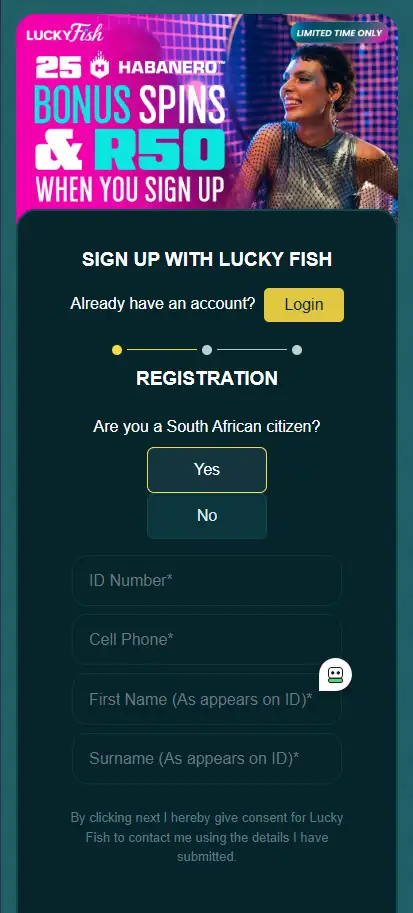
How to Register a Lucky Fish Account
Registration takes about three minutes if your details are to hand. You must be 18 or older and a South African resident.
What to have ready
- Your South African ID number (13 digits). Foreign nationals can use a passport number
- The cellphone number you want as your login, one you’ll keep long-term
- A working email address
- Your residential address and province
- Proof of address dated within the last three months, for FICA
- Bank details for later deposits and withdrawals
Open the registration form.
Create your credentials.
Enter your personal details.
Set your location.
Accept the terms.
Submit.
Complete FICA.